
This is the third post in the series. The first one was a pile of repurposed ThinkCentres in a homemade wooden tower, and the second covered how I split the machines into roles and started running them with an AI assistant. I put the physical build and the assistant into one post last time. They have both changed enough that they deserve their own, so this one is about the rack, the screen on its side and how OpenClaw is set up now.
The rack
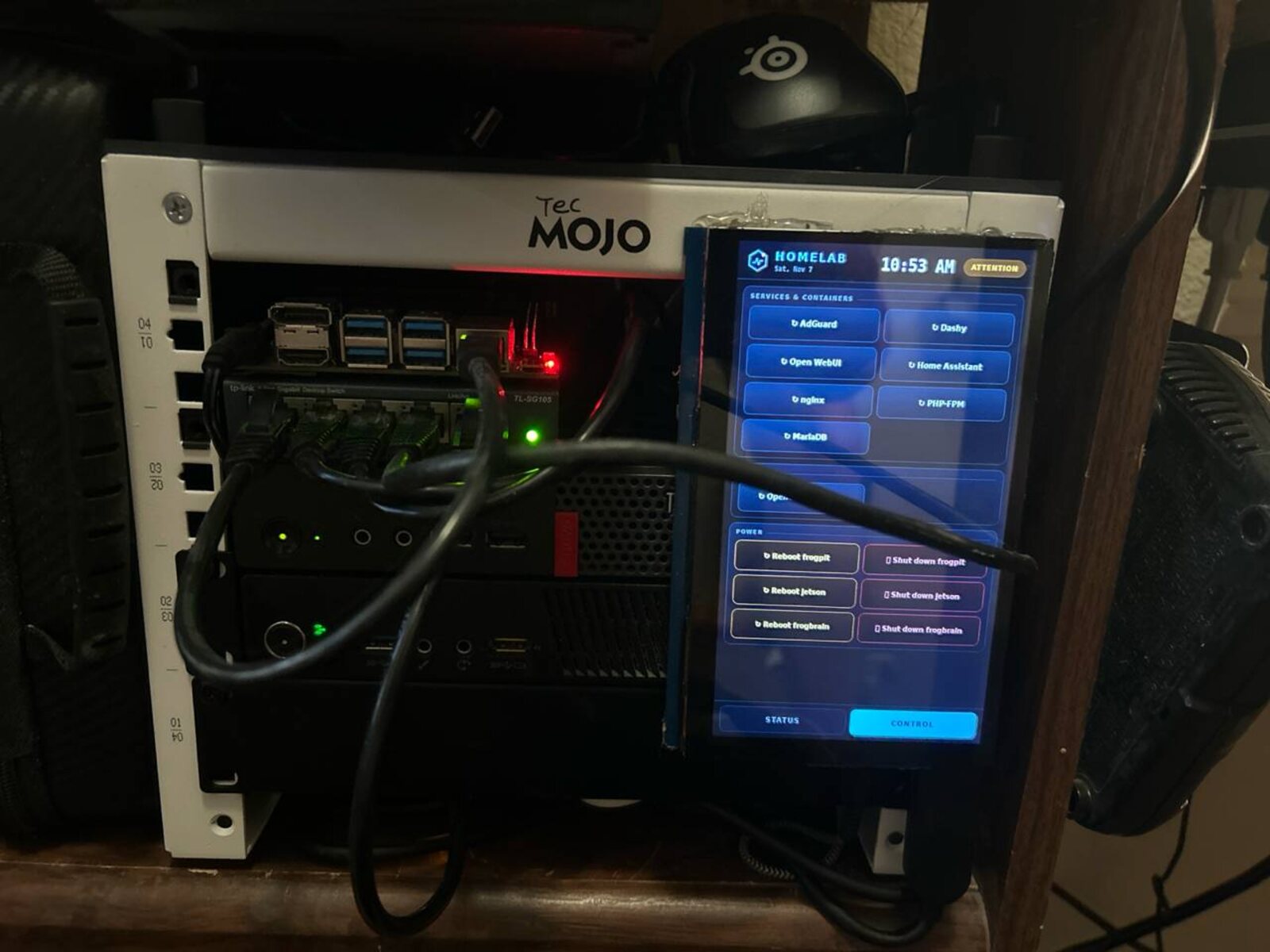
Everything now lives in a small TecMojo 10-inch rack. It holds a five-port gigabit switch, the two ThinkCentres (thefrogbrain, an M93p, and thefrogpit, an M710q) and the Jetson Nano. The gaming PC stays outside because it is a gaming PC first.

The wooden tower taught me that access matters more than looks, and a rack fixes that. Each machine has its own slot and its own cable to the switch, so I can pull one without disturbing the others. The cabling in the photo is not tidy yet. Routing and labelling it is next.
The 7-inch screen
I wanted to see the state of the lab without opening a laptop, so a 7-inch HDMI touch screen is mounted beside the rack in portrait. It is driven by thefrogbrain: video over HDMI, and touch over a separate USB cable, because the HDMI cable carries video only.
It shows two tabs.
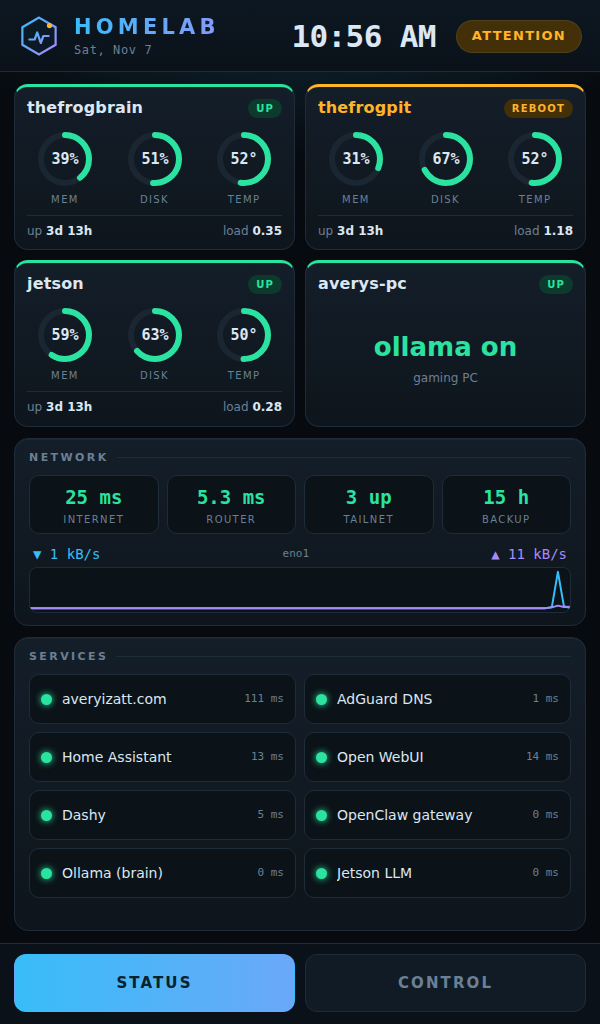
Status has a card per machine with memory, disk and temperature gauges, uptime and load. A machine that needs a reboot gets an amber badge, and one that is down turns red. Below that are internet and router latency, tailnet and backup health, a live traffic graph, and a grid of service checks for the website, DNS, Home Assistant, Open WebUI, the dashboard, the OpenClaw gateway and the local models.
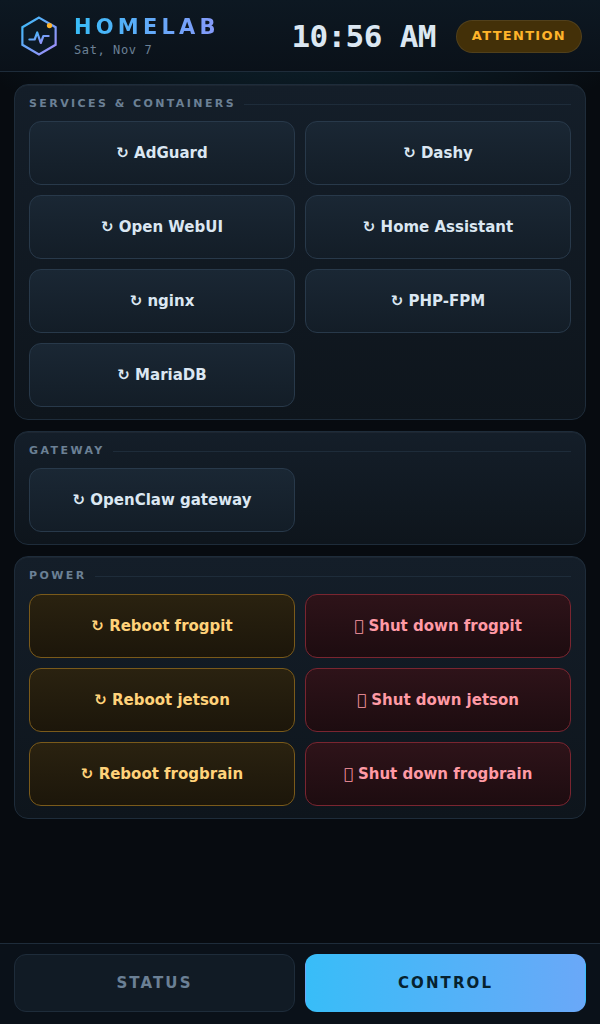
Control restarts services and containers with one tap and a confirmation. Under the hood it is a small Python service that only accepts a fixed list of actions, so the screen cannot run arbitrary commands. Some details that took more thought than I expected:
- The panel has no backlight control over HDMI, so the night mode dims it from 10 PM to 6 AM by lowering the display gamma to 25%.
- It starts at boot with no desktop. A system service launches a bare X session with a single browser window, and touch is re-detected every few seconds, so a replugged cable recovers on its own.
- The reboot and shut down buttons are in the layout, but I have not given them the sudo permissions yet. I would rather decide deliberately whether a touch screen should be able to power off my servers.
- The whole project is in Git and the nightly backup copies it to a second machine.
What broke on the way
Moving things around shook out two problems I had not noticed.
- A hard-coded address. After a reboot, the router gave the gaming PC a new address, and about ten scripts and config files still pointed at the old one. The fix for now was to update them. The real fix is a DHCP reservation in the router, so I do not have to search for the machine again.
- A DNS limit that dropped lookups. The network’s DNS filter, AdGuard Home, was rate-limited to 20 queries per second for the whole house. A burst of 60 lookups timed out on 42 of them, and games and Steam send bursts. Removing the limit, adding more upstream resolvers and turning on optimistic caching fixed it: a 100-lookup burst now answers completely.
OpenClaw is a coordinator now
In the second post OpenClaw was a Telegram front end for running commands. It is more structured now.
- One coordinator, small workers. The main agent stays responsive in Telegram. When a job is big and splits cleanly, it hands pieces to subagents, each with one task and a completion condition. A worker does its task and exits. Code workers get their own Git branch, so two never edit the same files.
- Scheduled jobs. A morning briefing runs daily. It checks project progress, fleet health, whether the backups really ran, and also pulls news and the weather. A health check runs every five minutes and only messages me when something changes state.
- Written rules and notes. Standing rules sit in the workspace (what it may do alone, and what needs my approval), plus a dated log of decisions and facts. Procedures that took real effort to work out, like a verified file transfer or a staged update across all machines, get saved as skills the next session can reuse.
- Memory is a file, not a vibe. I tried an automatic recall system fed by a small local model, and it injected confident but wrong snippets. Now durable facts go into a plain notes file, and recall is treated as a hint rather than an answer.
What I got wrong about local models
My plan was to send most coding and review to models on my own hardware. I tested it with two jobs. The 9B coding model’s script had four bugs, the 7B review was generic and contradicted itself, and each job cost a minute or two of overhead. So now a stronger hosted model does all the coding, debugging and review, and the local models only get bulk jobs where the result is cheap to check, like image captions, summaries and renames. I spot-check a sample before trusting any batch.
The briefing job taught the same lesson. It kept failing because I had pinned it to a local 7B model whose context window was too small for the prompt plus its tool list. Moving it to the stronger model fixed it. Matching the model to the job is most of the work.
Still true from before
It is only as careful as its rules. I keep restore points, I would rather it asked twice than guessed, and anything that matters gets checked against the real machine instead of trusted. The address change and the DNS fix above were diagnosed and fixed this week through the same Telegram chat, and the screen was built that way too.
What is next
- Tidy and label the cabling in the rack.
- Add a DHCP reservation so the machines stop changing addresses.
- Decide whether the power buttons on the screen should work.
- Give the Jetson a better job than being a very small CUDA experiment.
Like the last post, this was written with the assistant it describes, from my notes and the real configuration of the machines.