
This is the sequel to my first homelab post, which is still up as it was: a self-hosted website that grew into a pile of services on repurposed ThinkCentres. That version taught me a lot, mostly by breaking. This one is about what I changed because of it, and how I now run the whole thing with an AI assistant.
The goal is not to collect services. It is to make the systems I already use easier to operate, easier to recover and less dependent on one computer being awake. I built it from repurposed hardware, then added automation one failure at a time.
What changed since the first post
- The network became private by default. Tailscale connects every machine, so administration stays on a private network and only the services I mean to publish are reachable from the Internet.
- The machines got jobs. One computer controls, one hosts services, my gaming PC lends its GPU when it is awake, and a Jetson serves as an edge node. A failure in one place no longer takes down the rest.
- The services got more deliberate. AdGuard Home for DNS, one dashboard, Open WebUI for local models. Admin tools like Guacamole and Cockpit are now reachable only from my home network and Tailscale, instead of sitting on the public Internet.
- I added an assistant. An OpenClaw gateway lets me inspect, fix and build things from Telegram, under rules I set.
- AI runs locally where it can. Ollama models on my own hardware handle the cheap, easy-to-check work.
- Backups are checked, not assumed. Nightly snapshots, a copy on a second machine and a versioned copy in a private repository.
- The website moved off WordPress. averyizatt.com is now generated from Markdown files in Git, with a staging copy, tests and a one-minute rollback.
The current architecture

I deliberately left addresses, usernames and firewall details out of this diagram. The useful part is the separation of responsibilities:
thefrogbrainis the control plane. It runs the OpenClaw gateway, local automation, speech transcription and the routing layer for AI work.thefrogpitis the service host. It runs the website stack and containerized services such as AdGuard Home, the dashboard and Open WebUI.- My gaming PC is an on-demand accelerator. Its RTX 3060 can run larger Ollama models, but the model unloads when idle so the machine remains a gaming PC first.
- The Jetson and other trusted devices are edge nodes. They are reachable when a project needs them without making them public Internet services.
- Tailscale is the private network between them. Administration stays on the tailnet, while only intentionally public web routes go through the public reverse-proxy path.
This is a small fleet, but treating it like one has paid off. A web server problem should not take down the assistant; an AI model being offline should not take down DNS; and closing a laptop should not strand the only copy of a project.
OpenClaw as the operations layer
OpenClaw is the part that turns the homelab from a collection of services into something I can operate conversationally. The gateway runs on thefrogbrain, and Telegram is the interface I use most often. I can ask it to inspect a service, search logs, work on this website, collect files from an authorized PC or check whether a backup actually completed.
The important distinction is that the assistant is not simply issuing arbitrary shell commands. I set operating rules around it:
- read-only diagnosis can happen immediately;
- risky actions such as deleting data, rebooting a machine or changing networking require approval;
- changes should be narrow, backed up when necessary and verified afterward;
- access is limited to machines I have explicitly authorized;
- public messages and production changes get more caution than local inspection.
That policy is stored with the workspace, alongside durable notes about the machines and project runbooks. The conversation can end, but the system’s operating knowledge does not have to disappear with it.
Tools instead of one giant integration
The gateway uses small tools for specific jobs: SSH and node commands for machines, browser automation for web interfaces, GitHub access for repositories, document extraction for reports, and connectors for selected external services. Scheduled jobs use the same environment, so a health check and an interactive repair share the same machine inventory and safety rules.
For school material and portfolio work, this is especially useful. OpenClaw can gather source files from one of my PCs, checksum the transfer, extract the parts that belong on the site, update the Markdown project page, run browser tests and deploy a staging build without turning the live site into the test environment.
How I actually use the AI
The assistant is the part people ask about, so here is what it does day to day, and where I deliberately do not let it.
- Telegram is the front door. I ask how a machine is doing, whether last night’s backup really completed, or to check a service. It runs the commands, reads the output and answers in a few lines.
- It builds things with me. This website is the biggest example. I describe what I want in a message, the assistant writes the code and the tests, deploys to a staging copy, and I look at it on my phone before anything goes live. Production changes need my go-ahead, and the old version can be restored in under a minute.
- I can dictate a post. I talk through a project, it turns that into a Markdown draft with the images and a cover, and commits it. I still decide what gets published.
- Models have roles. A stronger model does the coding, architecture and review. Local models on my own hardware do bulk jobs that are cheap to check: the first-draft alt text for 134 images on this site came from a local vision model, and I spot-checked a sample before trusting the batch. The rule is that nothing silently falls back to a paid model, and if the gaming PC is off, the assistant tells me instead of sending the job somewhere unexpected.
- It works from written rules. Read-only diagnosis can happen at any time. Rebooting, deleting, changing networking or firewall settings, and anything public need my approval. Changes are small, backed up first when it matters, and verified afterward.
What it is not good at
- It is only as careful as its rules. A cleanup that touches the wrong thing can do real damage, so I keep restore points and I would rather have it ask twice than assume.
- It makes confident mistakes. Anything that matters, like a wiring diagram, a backup or a production change, gets checked against the real thing instead of trusted.
- It does not replace understanding. I can only supervise it on topics I know well enough to catch it, which is a good reason to keep learning the underlying systems.
Local AI without making it a hard dependency
I run Ollama locally for tasks where privacy and cost matter more than using the largest model. thefrogbrain provides the always-available endpoint, while the gaming PC can provide a larger GPU-backed model when it is awake. Open WebUI on the service host gives me a normal browser interface to those models.
The routing policy is intentionally conservative. Local models are good at bulk, cheap-to-check work such as first-pass image captions, file summaries and mechanical formatting. Coding, architecture and security-sensitive changes still need a stronger model and real tests. If the gaming PC is off, the system reports that rather than silently sending the job somewhere unexpected.
For audio, a local whisper.cpp installation handles transcription. That keeps recordings on my own machine and gives automation a plain text artifact that can be searched or turned into a draft.
Services on the server host
The service machine runs workloads that should stay available even when my desktop is off:
- The website stack: Nginx serves the public site and the staging build. The new site is generated from Markdown, so the content, diagrams and project metadata are versioned with the code.
- AdGuard Home: network-wide DNS filtering for devices on the home network.
- Dashy: one dashboard for the services I actually need to reach.
- Open WebUI: a browser front end for local Ollama models.
- Reverse proxy and tunnel routes: only the services meant to be public receive a public route; administration stays private.
Earlier versions of the homelab ran WordPress, MariaDB, PHP, media services and browser-based remote desktops, as described in the first post. The current direction is simpler: keep what is useful, remove hidden dependencies and make the remaining services reproducible.
Monitoring and self-healing
A five-minute fleet-health job checks the things that are actionable rather than dumping every healthy metric into a dashboard. It looks for unreachable hosts, failed core services, unhealthy containers, storage pressure, backup failures and abnormal GPU temperature. The gaming PC being powered off is normal, so that is informational rather than an alarm.
For a small set of well-understood services on the server host, the check can restart only the failed service. Notifications are state-based: I get a Telegram message when something becomes unhealthy or recovers, not the same warning every five minutes.
This distinction matters. Automation should reduce noise and shorten recovery; it should not hide a recurring failure behind endless restarts. The underlying event is still logged so I can fix the cause.
Backups that are verified, not assumed
The OpenClaw workspace is snapshotted every night with fourteen-day local retention, then copied to the server host. A second job writes a dated branch to a private Git repository. That gives me three useful recovery properties: a recent local copy, a copy on another machine and versioned off-machine history.
For one-time transfers, I use a manifest-first workflow:
- inventory the source files and record their expected count and size;
- create the archive on the source machine;
- transfer it without modifying the originals;
- compare a SHA-256 checksum at the source and destination;
- list the received archive and compare it with the manifest.
That last step exists because a file with a plausible name and size can still be a truncated transfer. A backup is not successful just because a scheduled command ran, and a copied archive is not complete until the receiver proves it.
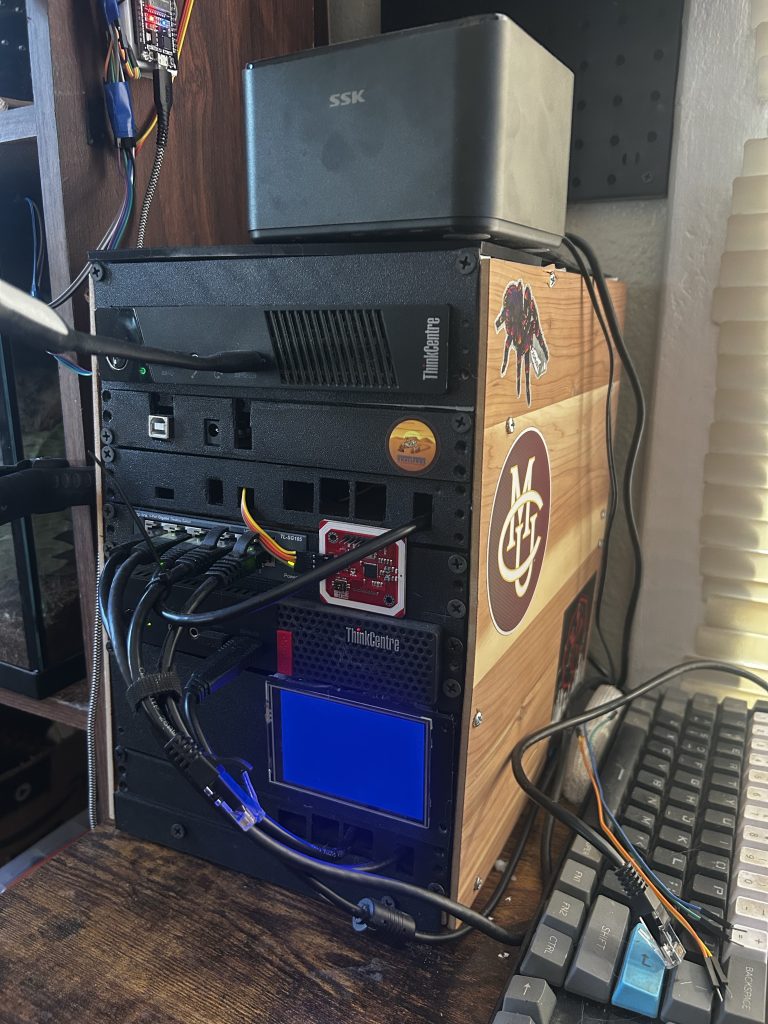
The physical build
The software grew alongside a physical enclosure project. I modelled a compact structure around repurposed Lenovo ThinkCentre hardware, storage and a small status display, with access for cabling and airflow. It was my first attempt to make the homelab feel like one maintained system rather than a pile of PCs on a desk.
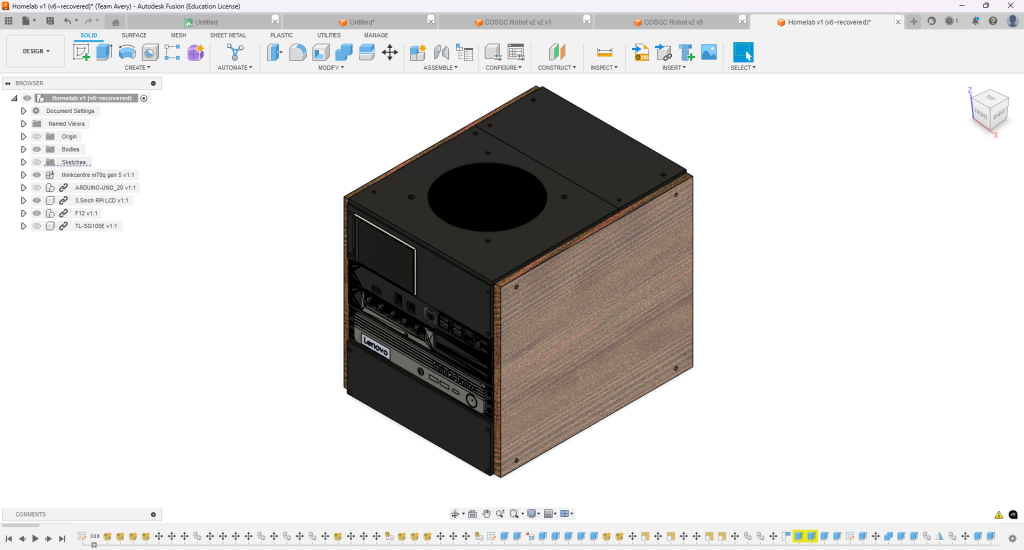
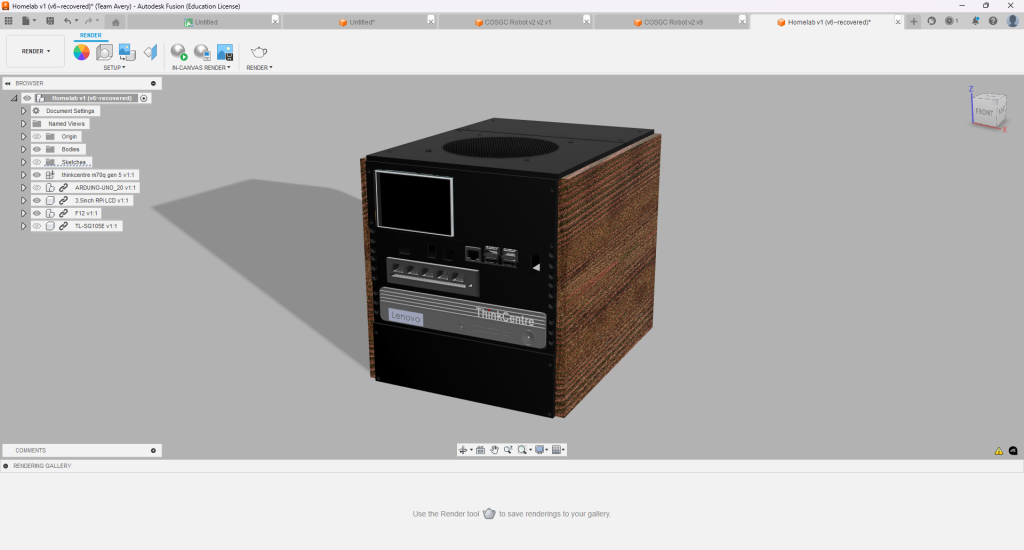
The enclosure work taught the same lesson as the software: maintenance access matters. A clean front view is not worth much if replacing a drive or tracing a cable requires disassembling the whole system.
What I learned
The most valuable parts of the homelab are not any one container or dashboard. They are the engineering habits it forced me to practice:
- separate control, compute and service roles so one failure has a smaller blast radius;
- keep management traffic private and publish only deliberate entry points;
- use keys and scoped credentials instead of reusing passwords;
- test restoration and transfer integrity, not merely backup creation;
- make alerts represent state changes and actionable thresholds;
- keep configuration, runbooks and project history in version control;
- stage changes and verify the real user path before touching production.
The result is still a lab: it changes as I learn, and sometimes the lesson begins with something breaking. The difference now is that I can see the failure, understand which layer owns it, recover it and leave the system better documented than it was before.
This post was written with the assistant it describes, from my notes and the actual configuration of the machines.